
The fear nobody warns you about
I run a few small products on my own. Writing the code was never the scary part. The scary part is everything that can quietly go wrong once it’s live and you’re not looking.
A background job silently piles up. A query that used to be fast isn’t anymore. An endpoint starts throwing errors on one weird edge. None of it pages you. None of it shows up until a customer hits it, or you happen to glance at a dashboard and feel your stomach drop.
When you’re a team of one, there’s no on-call rotation. You are the rotation. And you can’t sit and stare at Grafana all day, you’ve got a product to build.
So I built something to do the staring for me. I’ve been calling it The Sentinel.


What it actually is
Nothing exotic. A handful of Python scripts on a little box at home, a cron job firing them every few minutes, and the usual open-source tooling doing the boring work underneath, Prometheus ↗️ for metrics, Loki ↗️ for logs, that sort of thing. The scripts pull together what’s happening across the servers and apps that actually matter, and hand it all to one place that looks at it properly. That’s where I plug in Claude ↗️ to do the thinking, and it’s the bit that makes this more than another dashboard.
Everything pushes to Telegram, because the bar for “tell me something is wrong” should be a notification on my phone, not a tab I have to remember to open.

Rule one: shut up unless it matters
Most monitoring gets one thing wrong, and it’s the thing I cared about most. Noise.
A system that cries wolf is worse than no system at all, because you learn to ignore it, and then you ignore the one alert that actually mattered. I’ve muted enough chatty alerts in my life to know exactly how that movie ends.
So the sentinel runs on one strict rule: only talk to me when something that was supposed to happen didn’t. No “everything’s fine” pings. No panic because CPU touched 80% for four seconds. If a backup didn’t run, if a queue is genuinely stuck, if spend suddenly jumps, if a brand-new error nobody’s seen before just showed up, that’s worth my attention. A bot poking at random URLs is not.
If it can’t be acted on, it doesn’t get sent. A quiet system you trust beats a chatty one you tune out.
Getting this right took real tuning. The first version pinged me for things that fixed themselves a minute later. So now it waits, checks whether a problem actually sticks around, and only then bothers me. Most blips never reach my phone, which is exactly the point.
It doesn’t just alert. It investigates.
This is the part I’m a little too proud of.
An alert is a starting point, not an answer. “Latency spiked on this endpoint” tells you something’s wrong, not what or why. Normally that’s where your evening begins: sshing around, grepping logs, slowly piecing it together.
With the sentinel I just reply to the alert. Right there in the chat. “What actually happened here?”
And it goes and finds out. Read-only, it pokes around the live system, the logs, the database, the metrics, and comes back with a real answer: what broke, why, the evidence, and what to do about it. Not a guess. The actual thing, dug out of production.
The first time it handed me a root cause I’d have spent an hour chasing myself, I genuinely laughed.
And then it opens the fix
Okay, this next bit still feels a little like cheating.
When the digging turns up a real, durable bug, something in the code that’s going to keep biting until it’s fixed, the sentinel can go one step further. It writes up a proper issue and opens a pull request with the fix. I just read it and merge.
It’s gated, on purpose. Nothing happens without me. I get the alert, I approve the dig, it investigates, it decides whether the thing is genuinely worth fixing, and only then does it open the issue and the fix. I’m always the one who says ship it. But the grunt work, the finding, the writing-up, the first draft of the fix, all of that happens without me touching a thing.
Something that spots the problem, works out whether it’s even real, and then hands me the fix. I’m still getting used to that.
The intent layer for B2B outbound

CatchIntent spots real buying signals on LinkedIn and gives you a short daily list of in-market buyers, scored and with the opener drafted. You just send.
The ROI showed up almost immediately
I figured I’d be babysitting this thing for weeks before it earned its keep. It earned it in days.
In the first stretch of being live, it caught:
- An endpoint quietly returning server errors on requests it should have just turned away cleanly. Wrong and noisy, and I had no idea.
- A query that had gotten slow because it was missing an index, the kind of thing that’s invisible right up until traffic finds it.
- Background jobs silently getting stuck instead of finishing, quietly piling up where nobody would’ve looked until it actually hurt.
None of these were on fire yet. Every one of them would have been, eventually, at the worst possible moment, in front of a real person. Catching them early, before they turned into an incident, paid for the whole thing several times over.
Oh, and it fights my chargebacks
Here’s a use I genuinely didn’t see coming.
Every now and then someone disputes a charge, a chargeback. When that happens you get a short window to prove the person actually used what they paid for, or you just eat the loss. And proving it is a scramble: dig through logs, find their sign-up and their logins, pull their usage, stitch it all into something convincing before the clock runs out. It’s an afternoon of dread, every single time.
But the sentinel already knows my apps inside out. The data, how it’s stored, the analytics, all of it, on read-only. So instead of doing that scramble myself, I just point it at a customer. It pulls the whole story together on its own, who they are, when they signed up, every login and where from, what they actually did in the product, and lays it out as a clean evidence pack I can hand straight to the payment provider.
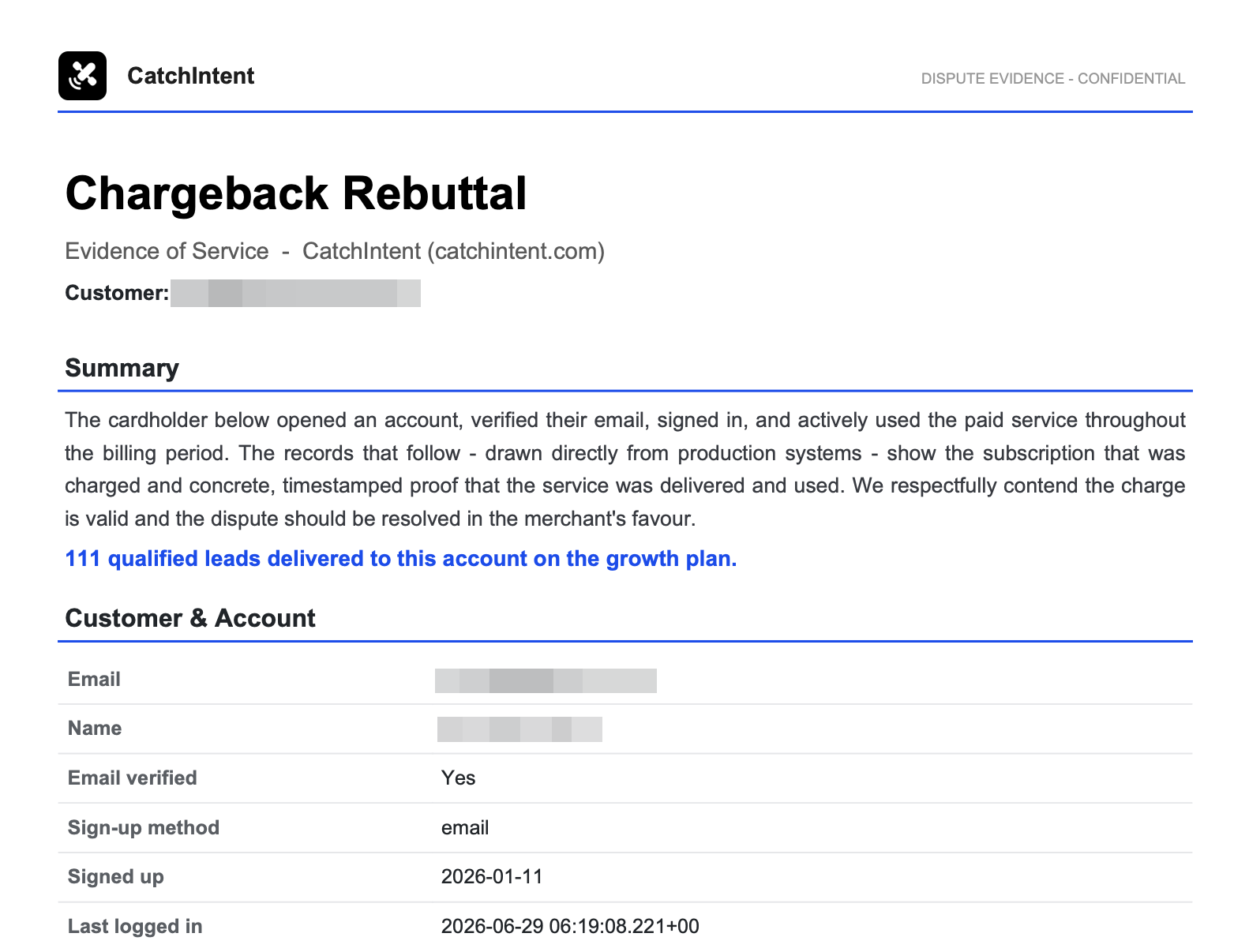
Something that used to wreck an afternoon is now a one-line ask. Right now I kick it off myself, but the plan is to have it fire the moment a dispute lands, so the evidence is sitting ready before I’ve even finished groaning.
That’s the part that surprised me. I built this to watch for things going wrong, and the same “knows everything, reads everything” foundation turned out to be just as handy for a completely different kind of fire.
Edited on July 3rd, 2026
I’m going to keep a running log here. The sentinel keeps growing, so instead of quietly rewriting the post every time, I’ll add what’s new under a fresh date. Think of it as the journal of a thing that isn’t done.
I’m teaching it High Valyrian
This part is pointless and I love it.
The whole thing works by me replying to the alert in Telegram. So one evening I decided the replies didn’t have to be boring. If you’ve watched Game of Thrones, or you’re keeping up with House of the Dragon season 3 right now, you know the word the Targaryens use to make their dragons breathe fire: Dracarys.
So now, when an alert comes in and I’m sure it’s a real bug, I don’t type out “yes, go investigate this and open a fix.” I just reply Dracarys. A dragon-fire GIF pops into the chat, and off it goes to burn the bug down. It investigates, confirms it’s real, and opens the issue and the fix.
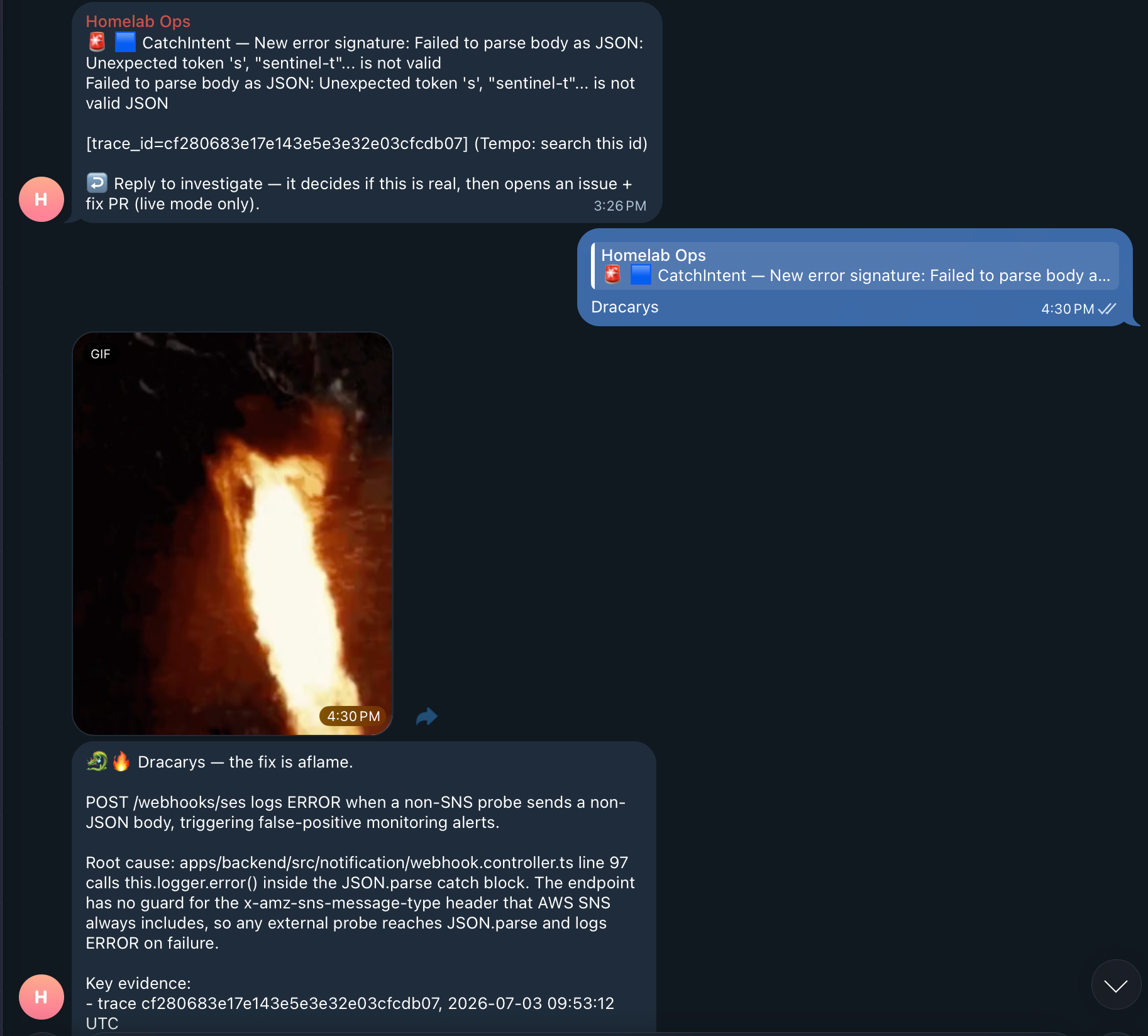
Then I got carried away and added a few more:
- Dracarys. It’s a real bug. Go investigate and open the fix.
- Send the ravens. Look into this and tell me what you find, but don’t touch anything.
- Lykiri (High Valyrian for “be calm”). Quiet this one down for a bit, I’ve seen it.
- The watch has ended. It’s nothing, drop it.
None of this makes the sentinel any better at its job. It just makes me smile every time I use it, so I use it more. I’ll take that.
It also does my homework before calls
There’s one more job it’s quietly taken over, and this one has nothing to do with things breaking.
People book discovery calls for my apps through Cal.com ↗️. I used to do the same scramble before every one: who is this person, what company are they from, what do they actually do, are they a real lead or just poking around. Ten minutes of googling, usually while the call was already ringing.
Now, the moment someone books, the sentinel picks it up on its own and drops a short briefing into my chat. Who they are, what they probably want, what’s worth asking. By the time I join the call, I’ve already done my reading.
Same setup as the chargebacks. It already knows my apps, so pointing it at “this person just booked time with me” is barely any extra work.
Want help with this on your own server?
I run my apps on my own servers and I have been writing about it here for years. If you are stuck on your own setup, or you want someone to look at it with you before you trust it with real users, you can book an hour with me. I only take 4 calls a month.
What it’s not
Let me be honest, because the internet loves to oversell this stuff.
It is not some autonomous wonder-bot running my company. It’s hacky. It’s wired specifically to my setup, my servers, my apps, my quirks. It only ever reads from production, never writes, by design, because the last thing I want is a clever little script confidently breaking the thing it was built to protect. And a human, me, stays in the loop for anything that matters. That’s not a limitation I’m planning to remove. It’s the whole point.
And it’s not magic. It’s a bunch of small, boring scripts and one decent interface, nothing you couldn’t put together yourself. The only part I actually sweated was keeping it quiet, it sees a lot and tells me very little, and it doesn’t act on anything until it’s sure.
The takeaway
Being a team of one usually means exactly that. One set of eyes, and a constant low-key worry about all the stuff you can’t watch at the same time.
That’s the part that’s changed. The watching, and the first crack at fixing, mostly happen without me now, and I still make every call that matters. It just doesn’t feel like I’m doing all of it alone anymore.
If you’re running things solo, build something like this. Not because it looks cool, but because it gives you back the thing you’re always short on: being able to step away and trust that something’s still keeping an eye out.